
In this article
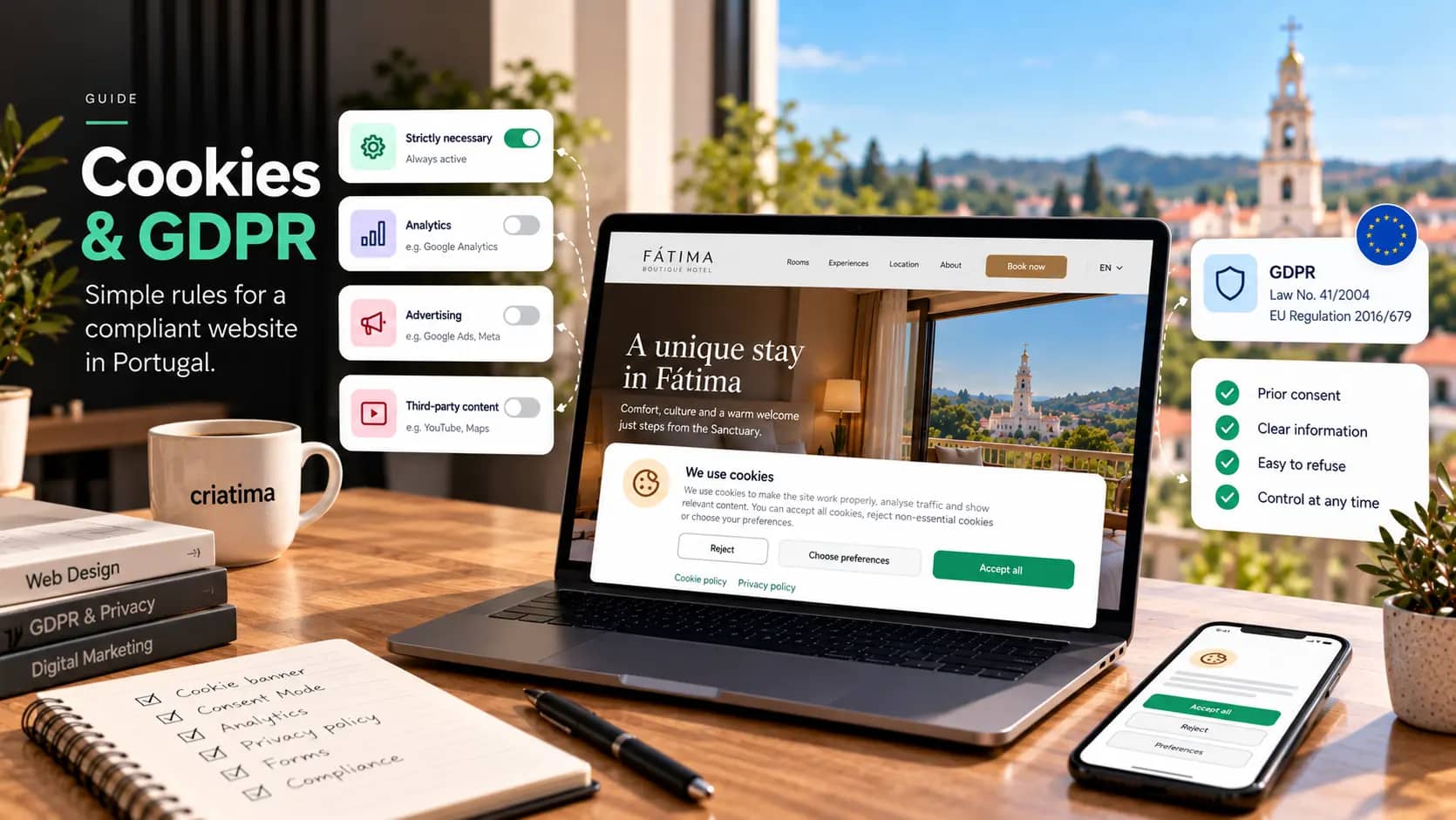
In Portugal, a website may only set cookies that aren’t strictly necessary (for analytics, advertising or social media) after the visitor has given consent freely, on an informed basis and through a clear action, such as clicking “Accept”. Refusing must be as easy as accepting, and consent must be possible to withdraw at any time. Forms that collect personal data must explain what the data is for and link to a privacy policy.
This guide summarises the rules that apply to an SME’s website and the most common mistakes we see. It is for information only: for specific cases, consult a lawyer or your data protection officer.
The laws that apply
There are two main texts to bear in mind:
- Portuguese Law No. 41/2004, which transposes the EU directive on privacy in electronic communications (the ePrivacy Directive). Its Article 5 requires prior consent before storing or accessing information on the user’s device, which includes cookies and similar technologies. You can read it in the Diário da República, Portugal’s official gazette (in Portuguese).
- The EU General Data Protection Regulation (GDPR), which defines what valid consent is and sets the rules for any processing of personal data, including data that comes in through forms. Official text on EUR-Lex.
In Portugal, the supervisory authority is the National Data Protection Commission (CNPD).
Which cookies need consent
Cookies that don’t
Cookies that are strictly necessary for the service the visitor has asked for are exempt, for example:
- Keeping the shopping basket in an online shop.
- Keeping a logged-in user’s session.
- Storing the visitor’s own consent choice.
- Ensuring the server’s security and load balancing.
Cookies that do
Practically everything else requires prior consent:
- Analytics, such as Google Analytics.
- Advertising and remarketing, such as the Meta or Google Ads pixels.
- Embedded third-party content that sets its own cookies, such as some videos, maps and social media buttons.
- Behaviour tools, such as heatmaps or session recordings.
“Prior” really does mean before: these tools must not load until the visitor accepts.
What a compliant cookie banner looks like
A compliant banner has these features:
- “Accept” and “Reject” buttons given equal prominence, on the first layer. Hiding refusal behind “Settings” or in a discreet link isn’t acceptable.
- No pre-ticked boxes. The Court of Justice of the European Union has ruled that pre-ticked boxes do not constitute valid consent.
- Choice by purpose: analytics, advertising, third-party content.
- Clear information: which cookies, what for, from whom and for how long, in an accessible cookie policy.
- Nothing loads before the choice is made, except what is strictly necessary.
- Withdrawing consent is as easy as giving it, for example through a permanent link in the footer.
- Continuing to browse isn’t consent. Closing the banner or scrolling doesn’t count as acceptance.
And don’t forget the impact on performance: a poorly implemented banner pushes content around and harms the mobile experience. We cover this in our guide to Core Web Vitals.
Google Analytics, Google Ads and Consent Mode
If you use Google tools to measure visits or campaigns, you should set up Consent Mode, which adjusts how the tags behave according to the visitor’s choice. For advertisers using Google who measure conversions from visitors in the European Economic Area, Google requires consent to be passed on to its tools.
In practice, this means the consent management tool, the Google tags and the website all have to be configured together. When it’s done badly, you lose conversion data and, with it, the ability to optimise your campaigns. It’s something we always check on the Google Ads accounts we manage.
Forms: contact, quote requests and newsletters
Every form that collects personal data should:
- Collect only what’s necessary. For a contact request, name, email and message are enough. Address, date of birth or tax number only if they are essential.
- Explain on the form itself, briefly, what the data is for, with a link to the privacy policy.
- Keep purposes separate. Replying to a quote request and sending a newsletter are different things. For the newsletter, use a dedicated box that isn’t pre-ticked.
- Be secure: a secure connection (HTTPS), spam protection and restricted access to the messages received.
Email marketing has additional rules on consent and exceptions for existing customers. We explain them in our guide to email marketing for small businesses.
The privacy policy
Your website should have a privacy policy accessible from every page, usually in the footer, explaining at least:
- Who the data controller is and how to contact them.
- What data you collect, for what purposes and on what legal basis.
- How long you keep it.
- Who you share it with, including providers such as your hosting, email or analytics tools.
- Whether there are transfers outside the European Union.
- The data subject’s rights (access, rectification, erasure, objection, portability) and how to exercise them.
- The right to lodge a complaint with the CNPD.
Copying another website’s policy is a common mistake. Every policy must reflect what your website actually does, with the tools it actually uses.
Common mistakes we see
- Google Analytics or advertising pixels loading before consent.
- A banner with only “Accept”, or with “Reject” hidden away.
- An out-of-date cookie policy that doesn’t mention tools installed later.
- Embedded videos that set cookies without warning.
- Forms with the newsletter box already ticked.
- No way to change consent after the first choice.
Quick checklist
- I have a list of every tool on the website that uses cookies or collects data.
- No non-essential tool loads before consent.
- The banner gives “Accept” and “Reject” equal prominence.
- There’s a permanent link to change preferences.
- The cookie policy and the privacy policy are up to date.
- Every form states its purpose and links to the privacy policy.
- Google Consent Mode is set up, if I use Google tools.
On the websites we build through our web design service, analytics tools only load after consent, and forms include the information and the link to the privacy policy. For existing websites, our maintenance and hosting service includes reviewing these points whenever a new tool is added.
Frequently asked questions
Do I need a cookie banner if I only use necessary cookies?
You don’t need to ask for consent for strictly necessary cookies, but you should inform visitors about them, usually in your cookie or privacy policy. If you don’t use analytics, advertising or third-party content that sets cookies, you can do without a consent banner. Do check, however, that no plugin or embedded video is setting cookies without your knowledge.
Does Google Analytics need consent?
Yes. Google Analytics isn’t strictly necessary for the website to work, so it may only load after the visitor accepts analytics cookies. With Google Consent Mode properly configured, you can respect that choice and still get some aggregated information about visits.
Can I use a free privacy policy generator?
It can serve as a starting point, but it’s rarely enough. The policy has to describe what your website really does: what data it collects, with which tools, for how long and who it’s shared with. A generic text that doesn’t match reality doesn’t meet the GDPR’s duty to inform.
Who is responsible if the website doesn’t comply?
The company that owns the website, as the data controller, even if the website was built or is maintained by someone else. That’s why it’s worth requiring your provider to make sure analytics tools only load with consent, and that the setup is reviewed whenever something new is installed.

Suzi Rodrigues
Business Manager